A Crisp on markdown
Developer essentials - A must-know for every developer

Tech enthusiast from The Silicon City of India. Fascinated by technology. Currently upgrading my learnings on the backend concepts. Resourceful, Passionate about building new projects. Kaizen on problem-solving skills. Interested in Software Development, Blockchain and also love to play cricket.
Markdown
Markdown is a markup language that formats plain text. The intention behind Markdown is that plain text documents should be readable without tags mussing up everything.
Creating heading
We can create a heading using the # symbol.
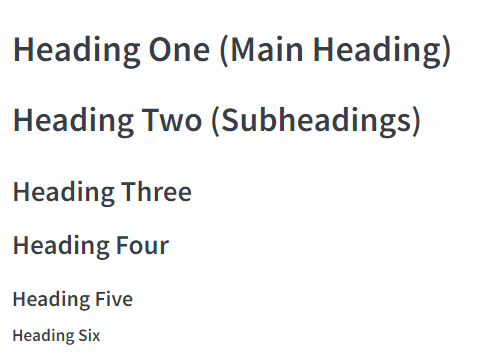
We can have six different types of headings.
Syntax:
# Heading One (Main Heading)
## Heading Two (Subheadings)
### Heading Three
#### Heading Four
##### Heading Five
###### Heading Six
OUTPUT:
Bold and Italic Styling
We can style the texts as bold using **value** or __value__.
We can style the text as italics using *value* or _value_.
Syntax:
<!-- Bold styling-->
**This sentence is bold now**

__Even this is bold__

<!-- Italic styling-->
*This sentence is Italic now*

_Even this is Italic_
OUTPUT:
This sentence is bold now
Even this is bold
This sentence is Italic now
Even this is Italic
Strike-through
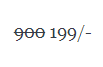
We can strike text using ~~value~~.
Syntax:
~~900~~ 199/-
OUTPUT:
Lists
Ordered List
We can use the ordered list by specifying the number and a dot (period) 1. 2.
Syntax:
1. One
2. Two
3. Three
OUTPUT:
- One
- Two
- Three
Unordered List
We can create the unordered list by specifying the - symbol.
Syntax:
- One
- Two
- Three
OUTPUT:
- One
- Two
- Three
Sub List
We can create sub list of a list by giving a tab space and using the ordered or unordered list syntax.
Syntax:
<!-- Ordered Sub List -->
- One
  1. one sub
  2. two sub
  3. three sub
- Two

<!-- Unordered Sub List -->
1. One
  - one sub
  - two sub
  - three sub
2. Two
OUTPUT:
- One
- one sub
- two sub
- three sub
- Two
- One
- one sub
- two sub
- three sub
- Two
Links
We can specify links using []() i.e. [Display Text](Link).
Syntax:
[Google](https://www.google.com)
OUTPUT:
Including Images
We can include images using !()[] i.e. !(Alternate Text)[Link].
Syntax:
OUTPUT:
Code snippets and keywords
We can add code snippets and highlight the keywords using the following syntax.
`value` -> Keyword highlighting.

``` programming language (javascript, java etc)
code -> code snippets
``'

NOTE: It should end with ``` as  hashnode also uses markdown syntax.
 I have deliberately made a mistake by closing it using ``'.
OUTPUT:
value
code
Backquote
We can add backquotes using > symbol.
Syntax:
> He there everyone! Aarya here
OUTPUT:
He there everyone! Aarya here
Horizontal Line
We can draw a horizontal line using *** or ___
Syntax:
Hello
***
There

My name is
___
Aarya
OUTPUT:
Hello
There
Aarya
Tables
We use pipes | to specify columns, - to separate header columns, and : to specify an alignment.
Syntax:
| Name | Occupation|
| --- | --- |
| Aarya| CEO Adevs |
| Hitesh | CTO Ineuron |
OUTPUT:
| Name | Occupation |
| Aarya | CEO Adevs |
| Hitesh | CTO Ineuron |


